News for the ‘Synaesthesia’ Category

Synaesthesia beta 5 now available…

Well, it’s the end of the month, and so that means it’s time for a new beta release.

This update doesn’t really add anything new, but instead focuses on improving the nuts and bolts of the software. We’ve improved some of the codebase, which for you means that we’ll be able to roll out more integrations and add functionality faster and more reliably than before.

We’ve also made big gains in terms of performance. We’ve identified a few areas that were noticeably slow (namely, displaying lists of items on breakdowns), run tests, taken it apart and rebuilt it again to see what we can do to make it faster. That’s led to an increase in speed of about 5 times.

That’s right, displaying lists of items now happens 5 times faster. What that means is that you’ll rarely even notice that you’re waiting for the list to be displayed. And to be honest, that’s the way it should be. Of course, you’ll only really notice the difference if you’re working with huge lists anyway. But given that there are 200-300 scenes on average per production, it won’t be long before you appreciate the difference. Oh and speaking of lists, we also added the ability to filter them by free-typing (in addition to using tags), which will make it much easier to find items when looking through those long (speedy) lists.

There’s the usual bunch of fixes, and other minor changes, and you can read all the gory details in the beta 5 release notes, if you’re so inclined.

The next release is going to incorporate user feedback so far, so keep that feedback coming. As usual, everyone in the beta programme will be emailed soon with a new download link.

Posted: June 28th, 2010
Categories: News, Synaesthesia
Tags: , ,
Comments: No comments

Synaesthesia beta 4 released…

With much of the film industry sunning themselves on yachts in Cannes,  leaving the rest (i.e. the ones that do the work, right?) behind to work, I’m happy to announce Synaesthesia beta 4 for your pleasure.

Beta 4 comprises some new features and fixes, largely based on feedback from people at NAB last month.

Of particular note is the inclusion (finally) of a preferences dialog. It’s a bit sparse right now, but expect it to get filled up with all sorts of customisable features in the future. One of the noteworthy preferences in there is certainly going to make the DITs and data wranglers amongst you happy: Synaesthesia now has a setting to automatically capture MD5 (read: bulletproof!) checksums for any file you attach to anything. That means you get a checksum for the R3D file you’ve linked to a clip, as well as for the spreadsheet you’ve added to a scene.

Ok so that’s only half the picture, because the real use of having checksums is when you can verify them. Well, Synaesthesia will do that too! Any time you open an attachment in Synaesthesia, it will automatically verify the file for you and flag any differences. This means you don’t have to rely on third-party tools for verifying file integrity any more, which is typically more of a problem over longer periods of time (and ironically when verification is more important). Of course, Synaesthesia can’t fix your broken files, but it can at least give you fair warning of potential problems (you are doing backups, right?).

There’s a few other fixes and other changes in this release, we’ve increased the contrast of text labels so they’re easier to read– I guess not everyone does data entry in the dark (like I do). You should also notice some performance improvements too. As we move towards final release, expect performance to get some serious attention. For all the other changes, check out the release notes for this version.

On another note, after repeated issues with corrupted downloads, we’ve moved to a new server for downloading. Hopefully this will prove more successful, saving you guys frustration, and allowing us to spend more time packing great stuff into the next release.

As always, your feedback is much appreciated. Everyone enrolled on the beta programme will get an email soon, those that aren’t can still sign up.

Posted: May 20th, 2010
Categories: Synaesthesia
Tags: , , , , , , ,
Comments: No comments

Synaesthesia Beta 3 Released…

It’s NAB, so of course that means new releases. We’re no exception, and so a new version is now available for everyone on the beta programme. The latest version includes only one major new feature, but it’s a really good one: you can now import clip data from Final Cut Pro XML files.

With this latest addition, Final Cut Pro becomes another, extremely convenient source for capturing metadata and linking it into Synaesthesia. For example, you can shoot some footage, ingest it into FCP, and then save off the XML file. You can then import this XML file into Synaesthesia, which will then create reels, clips and attach their linked files for you. You then have all your footage inside Synaesthesia to use in the usual way, and if you make any changes, you can always export the clips as FCPXML and load that back into Final Cut.

The other bit of news is that we’re extending the beta programme, to include a greater number of users. Anyone interested in downloading the new beta version can do so for free at http://synaesthesia.surrealroad.com/beta

There’s been a lot of talk about shooting 3D at NAB this year. Let me jump on that bandwagon too. Synaesthesia can be used 3D productions, by setting up two recorders- one for the left eye and one for the right eye. You can then use shooting mode as you would normally.

As always, if you’ve already been accepted into the beta programme, you will receive an email soon with the download link.

Posted: April 12th, 2010
Categories: Synaesthesia
Tags: , , , , , ,
Comments: No comments

Synaesthesia Beta 2 Released…

I’m pleased to announce the release of beta 2 of Synaesthesia. All the reported bugs in beta 1 are fixed, and there are some great new features that make the application even more useable.

What’s new in this release? Well, according to our statistics, 89% of you use Final Cut Pro, so integration with Synaesthesia is a big priority for us. In this version, you can export clips to Final Cut Pro XML. (To do this, go to the clips tab of a breakdown, select the clips to export, and click export). When you import the XML into FCP, the exported clips will be added to a new bin, along with all the metadata Synaesthesia has for that clip, such as the scene, take, editing format and so on. And speaking of exports, it’s now possible to export screenplays (as text) and sequences (as EDLs).

FCP development is still ongoing, so expect a lot more in that area in future releases. Also new in this version is tighter RED camera integration. Whereas beta 1 would only retrieve RED metadata from files with RED’s software installed, beta 2 eliminates that restriction entirely. So when linking a clip to a file (via Clip Breakdown > Digital > Linked File), just point it at the R3D file and let Synaesthesia do the rest.

Some processes in Synaesthesia can be quite complex (and therefore lengthy), and so the latest version also includes feedback in the form of progress bars, so you can be confident that it is doing something, rather than just hoping it hasn’t crashed.

You can check out the release notes for more details on the other improvements and fixes. As always, the best way to send us feedback is from the software itself (Help > Send Feedback).

If you have already been accepted into the beta programme, you should be receiving an email soon with a link to download the latest version. If you have not yet enrolled in the beta programme, you can still apply to take part now.

Posted: March 29th, 2010
Categories: News, Synaesthesia
Tags: , , , , , , ,
Comments: No comments

Introducing Synaesthesia…

Synaesthesia is the new software product by Surreal Road. It’s been in development for around four years now, and is almost at a point where it is production-ready.

But what is it?

Having worked on all sorts of film and TV productions in different capacities (of greatly varying budgets), it often amazed me how “disconnected” every role seems. This is especially true in areas like post-production, where people employed to enhance or otherwise change particular shots would do so without any knowledge of the history of that shot. It might be possible to find out the camera and lighting setup used for a particular shot in some cases, but what about the intent behind that setup? What was the cinematographer aiming for, and how can I better enhance that, as opposed to the more usual practices of (at best) attempting to reverse-engineer a shot in order to understand it, or (at worst) changing things in a more haphazard manner until something looks good.

This was a problem I’ve encountered on almost every production, and in part it’s unavoidable. The reality is that just as the writers are often left outside the gates of production, so too are the production crew long-gone when it comes to post. This also becomes a practical and logistical problem. Where is a particular reel of film? What was the time and date of a particular shot? On a very organised production, it is likely that the editor would be armed with most of this information, but in all other cases, there is simply no one around to ask.

I look at software created for the visual effects industry, and it is staggering: the functionality and capabilities of VFX software is advanced to the point where it’s possible to use these tools to quickly create shots that are indistinguishable from reality. But when it comes to the actual production process, we’re in a technological drought. Even popular writing software, such as Final Draft, is only slightly more useable than TextEdit, even with years of industry experience and development put into it. What was I supposed to use in my capacity as data manager on various things to stay on top of everything? Excel?

The solution of course, is that (those computer-savvy enough) people tend to cobble together some sort of database (usually in the ubiquitous FileMaker Pro) which serves the immediate needs of the production. Much of the time this works out rather well, the production ends up with a bespoke system that covers most of the bases, something “good enough”. But what about those people who haven’t the time or the resources to create something from scratch, or those people who just want to hit the ground running? Well, you are who Synaesthesia was designed for.

At its core, Synaesthesia is about keeping track of things about a production, from start to finish. Here’s a typical scenario:

  1. You have a production. You add notes, storyboards, descriptions of characters, of sets, all to get a sense of what it’s about.
  2. At some point you have a screenplay. You import that and it links all the scenes with sets and characters you’ve previously created, and adds anything that’s missing.
  3. You refine the script, importing new versions as you go along, further fleshing out what you want to shoot and so on.
  4. You create a database of people and equipment  you’re going to need, and assign them to different parts of the production.
  5. You start shooting. You log what’s shot as it happens, along with notes, things like whether the take was good or not, what was recorded and making last-minute script updates.
  6. You import data directly from digital footage (such as RED camera footage), in order to accurately log timecodes, and shooting parameters.
  7. You start editing, having access to all your previous notes for each clip of footage that was shot. You can import sequences from an editing system and have Synaesthesia tell you which shot is used where. You can make changes to the edit from within Synaesthesia, and save those back to your editing system.
  8. You can designate certain shots as needing effects work, and update those shots as new effects versions are completed.
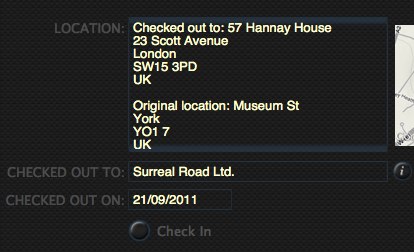
  9. Finally you can archive all the reels of footage, noting their locations, in case they’re ever needed again.

That’s quite a broad overview, and it assumes you’re going to use Synaesthesia from start to finish. But perhaps the best part of it is that you don’t have to. Maybe you’re only concerned with pre-production, and just want a place to keep storyboards, concept art, and screenplay versions organised? Maybe you just want to log continuity during a shoot? Or maybe you just want to tweak a couple of edits? Well then, Synaesthesia can help you.

It’s probably also helpful to mention what Synaesthesia (at least, in its current form) isn’t for:

  • It’s not for budgeting or scheduling
  • It’s not a replacement for software such as Final Draft
  • It’s not a replacement for systems such as Final Cut Studio
  • It’s not a server-based system, (it’s not possible for multiple people to make changes to the data at the same time).

A more detailed list of features is available  here. As I’ve said, Synaesthesia isn’t quite finished yet. It’s capabilities are still being worked out. But there are several key principles that we’ll always try to adhere to:

  • It will be simple to use
  • It will integrate with software you already use
  • It will give you the information you need

But more than anything else, I want it to be for whatever you (the user) need. With that in mind, we will be inviting people to try out pre-release versions in order to tell us what you like, what you don’t, and what’s missing. You can sign up for an invitation here.